Orch: parallel coding agents without running out of quota
Why I built Orch: to run several AI coding agents at once without burning through the provider's quota, and let clients see progress without asking.

A single coding agent working on its own is already a big help. The trouble is that when a project has lots of tasks that don’t depend on each other, waiting for one to finish before starting the next is wasted time. So you open several terminals and put an agent in each one, and that’s where the problems start.
The quota runs out mid-task
Anthropic, OpenAI and Google limit how much you can use within a time window. With one agent you almost never hit the limit. With four running against the same provider, you hit it fast. When that happens the provider blocks you, the agents stop halfway through, and your own terminal is out of service until the window resets.
People who don’t code want to know how it’s going
Almost every project has stakeholders who don’t write code and need to see it moving forward: the client, a partner, the manager paying for it. If you have no way to show them, you end up writing status updates instead of working, or they’re left wondering. That’s why I designed Orch with those people in mind as much as the person writing the code.
What Orch does
Orch is a command-line tool for these two problems. You write the work as a document with phases and tasks, and Orch turns it into a list where each task knows which others it depends on. Then it runs the ones that are ready in parallel, each with the agent you assign to it: Claude Code, Codex, OpenCode, Gemini or Antigravity.
With OpenCode you can also use models from other providers, for example through OpenRouter, or one running on your own machine. That lets you split the work, sending the hard tasks to a more expensive model and the mechanical ones to a cheap one, so you don’t depend on a single provider’s quota.
Each task works in its own copy of the repository on its own branch, and opens a pull request when it’s done. The agents don’t step on each other, and you can review each change separately.
As for quota, Orch keeps track of what each provider has consumed in its window. When usage gets close to the limit, it stops sending that provider new tasks and waits for the window to reset, so the block never happens.
The brake that didn’t brake
The first version of that brake had a bug that took me a while to spot: it never kicked in. Claude Code reports the tokens it reads normally separately from the ones it pulls from its cache, and Orch was only counting the first group. In one real task I checked, Claude reported 19 regular tokens and more than 60,000 from the cache. With that math, Orch figured about 770 tasks would fit in a five-hour window, so it never slowed down and the provider’s block arrived anyway.
I fixed it in version 0.15, in September. Cache usage now counts according to what Anthropic charges for it: reading from the cache costs 10% of a regular token and writing to it costs 125%. With the same task, the brake now kicks in after about 16, which is what the default setting was meant to do: leave you enough quota to keep using the agent by hand while Orch works.
The operator’s dashboard
While tasks run, Orch opens a dashboard in the browser for whoever is operating it. There you can see what each agent is doing, the dependency graph, how much of its window each provider has used, and each task’s path to a pull request.
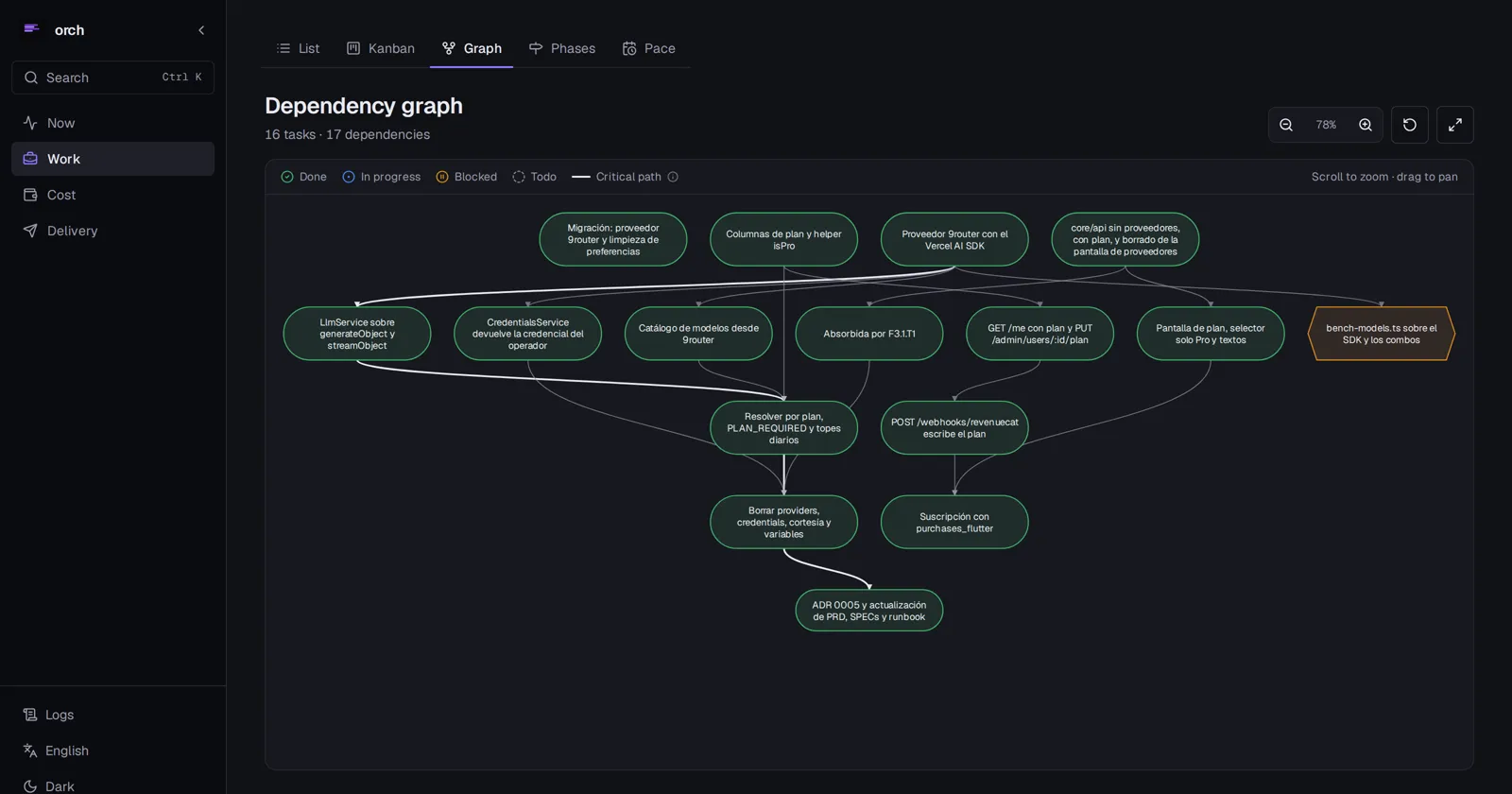
That’s the graph for fluent, a project of mine I built entirely with Orch: 16 tasks across five phases. Fifteen are done. The orange one is held on purpose: it calls a service that uses up other providers’ free quota, so I marked it to run only when I approve it. Orch won’t dispatch it and keeps it under “Needs your attention” until someone unblocks it.
The dashboard for that project is public at fluent-ops.knaimero.app if you want to look around.
A page for stakeholders
The client, or whoever needs to follow the project, gets a link to a page that updates on its own:
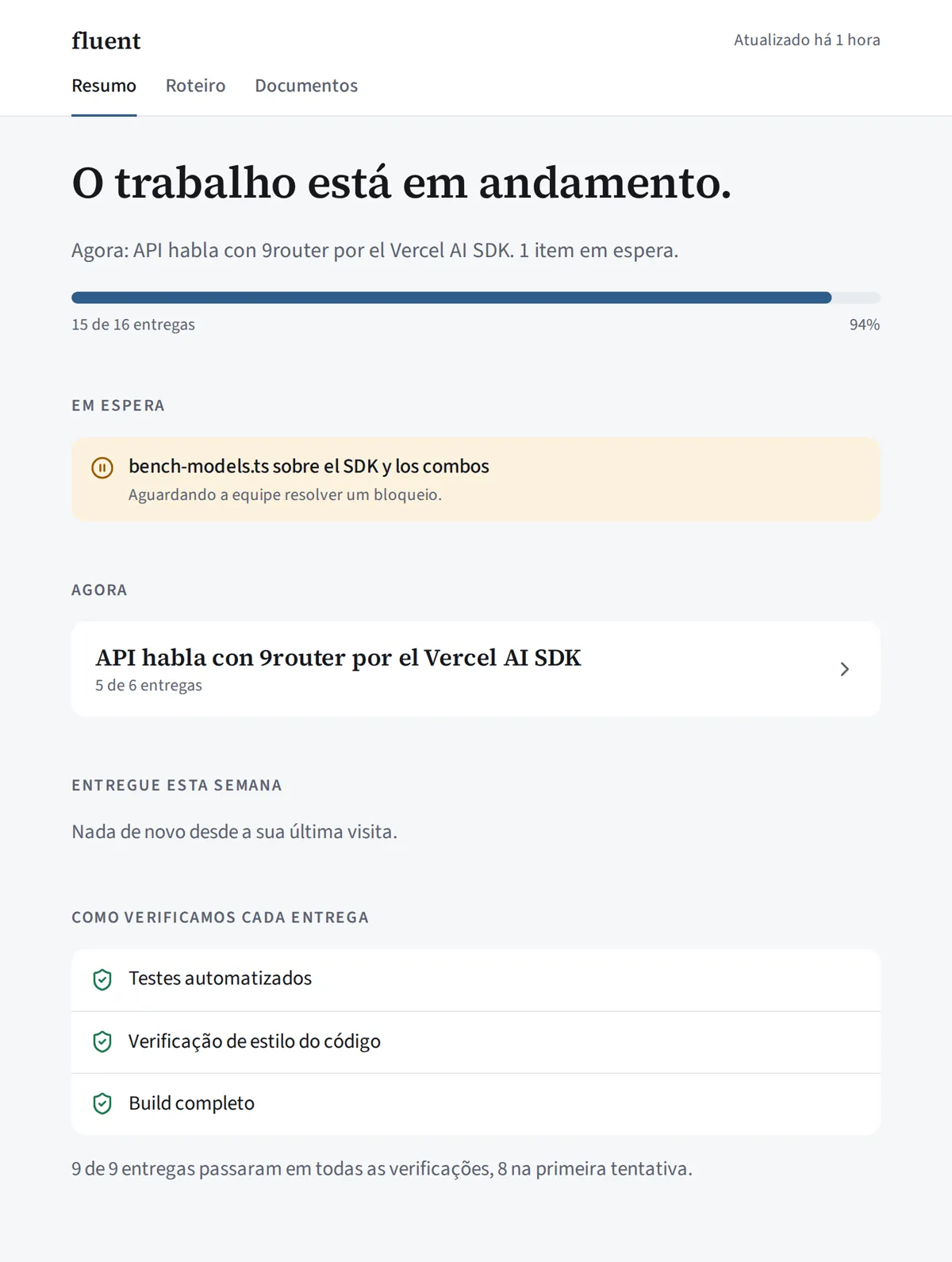
At the top, one sentence says where the work stands and how much has been delivered. Below it you’ll see what’s on hold and why, the stage in progress, what was delivered this week, and how each delivery was checked: automated tests, a code style check, and a full build. The page comes out in the project’s language; fluent’s is in Portuguese.
Orch builds that summary from the project data every time the page is opened, without calling any AI model. It costs nothing, and given the same data it always says the same thing. The client doesn’t see logs or code, and AI spending only shows up if you turn it on. You can see fluent’s page at fluent-orch.knaimero.app.
How to use it
orch atomize --apply   # from the document to the task list
orch run               # runs the tasks in parallel with the agents
orch publish           # generates the client page
It runs on your machine with the agents and keys you already have. It’s a single program written in Go, with no server to maintain, and it never stores a model key.
Other options
There are other open source tools for coordinating coding agents that are bigger and have more features, such as Multica, Vibe Kanban or Claude Squad. If what you need is to cap usage per provider or show a client how the project is going, that’s what Orch does and they don’t.
You can try it in the browser without installing anything or look at the code on GitHub. I ship a new version every week, and with each one I write about what changed and what broke.